You paid for a backlink. A guest post, a link insertion, a marketplace placement — real money left your account. Months later it's gone: the page was deleted, the link quietly stripped, or the whole domain lapsed. The ranking bump you bought it for goes with it. And it's rarely just one. You find one dead link, go looking, and two more placements you paid for are gone too — money no report ever flagged, because the cost lives in a spreadsheet and the link's status lives nowhere.
Search "backlink recovery" and almost everything you find is about something else: re-earning organic links by emailing webmasters and chasing unlinked brand mentions. Useful, but it doesn't help when a link you bought disappears before its term. That situation has its own playbook, and barely anyone writes it down. This is that playbook: how to get a removed paid link restored, how to get your money back when it can't be, and how to stop buying from sellers who don't keep their word.
If you just want to see the state of a link right now, you can check one for free in under a minute, no account needed. Then read on for the full recovery workflow.
Link reclamation and paid-link recovery are not the same thing
The confusion costs people hours, so it's worth being precise.
Link reclamation is about links you earned for free. A page that linked to you got deleted, redirected, or set to noindex; or a site mentioned your brand without linking. You recover or create the link by reaching out to the site owner. There's a whole industry of advice on this, and tools like Ahrefs cover it well.
Paid-link recovery is about links you bought. The other party isn't a stranger doing you a favor. They're a vendor you paid, with terms you agreed to. When the link vanishes, the question isn't "would you mind adding a link?" It's "the placement I paid for is gone before the agreed term — restore it, replace it, or refund me." Different relationship, different leverage, different workflow.
Most "lost backlink" guides answer the first problem. The rest of this article answers the second.
Why paid backlinks disappear
Before you can recover a link, you need to know what happened to it. The common causes:
- Manual removal. The site owner took the link down — sometimes by policy change, sometimes because your placement term ended, sometimes for no reason you'll ever learn.
- The page was deleted. The article hosting your link is gone, returning a 404. Your link died with it.
- A redirect or noindex. The page still exists but now 301-redirects elsewhere, or carries a noindex tag, so the link no longer passes value the way it did.
- The link turned nofollow. Still on the page, but the rel attribute changed, so it stopped passing equity.
- The anchor or URL changed. The link points somewhere else now, or the anchor text was rewritten.
- The domain lapsed. The whole site expired or changed hands. Nothing to recover there except your money.
Links also fade on their own. Ahrefs has written about link decay — backlinks are not permanent, and a meaningful share of any portfolio disappears over the years. For free links that's the cost of doing business. For paid links it's the cost of not watching them.
The recovery workflow, step by step
Recovering a paid link is a short, repeatable process. The hard part is catching the loss early enough that the seller still remembers you and the agreed term hasn't quietly run out.
1. Spot the loss fast
You can't recover what you don't know is gone. Manual spot-checks miss removals for weeks, and by then your leverage has cooled. This is the one step worth automating: monitor the links you paid for and get told the day one breaks, not the next time you happen to look. (A note on accuracy: plenty of monitors cry "lost" on JavaScript-rendered pages where the link is fine, so check the page yourself before you accuse a seller.)
2. Pull the receipt before you write
Open with facts, not a complaint. Before contacting the seller, have the placement URL, the date you bought it, what you paid, and the agreed terms (dofollow, anchor, how long it was meant to stay). A short, specific message lands better than an annoyed one.
Hi [name] — the link you placed on [page URL] on [date] is no longer live. We agreed it would stay [term] as a [dofollow] link with the anchor "[anchor]". Can you restore it, or place an equivalent link on another page on the site? If neither works, I'd like to arrange a refund for the remaining term. Happy to send the original order details.
Keep it factual and give them an easy way to make it right. Most legitimate sellers would rather replace a link than process a refund, and a replacement is usually the better outcome for you too. For copy-ready wording covering removals, 404s, nofollow changes, the refund ask, and the follow-up, see our backlink recovery email templates.
3. Get a replacement, or get your money back
One of three things happens:
- They restore it. The link goes back up. Confirm it's live and indexed before you close the case. A promise isn't a placement.
- They replace it. A new link on a different page. Record the new URL against the old one so your history stays honest and you're not paying twice for the same outcome.
- They refund you. If they can't restore or replace, the agreed terms are your basis for a refund. This is where written order details earn their keep.
And sometimes nothing happens. The seller ghosts you, or the site is gone for good. Then the honest move is to write it off: record the loss, learn from it, and don't buy from that source again.
4. Close the loop
Whatever the outcome, record it: restored, replaced, refunded, or written off, with the amount. This isn't bureaucracy. It's the data that tells you, six months from now, which sellers are worth buying from and how much of your link budget actually survives.
Holding sellers accountable
Browse any link marketplace and you'll see the same promises: 90-day replacement guarantees, "100% refund if the link disappears", lifetime replacement. They read well. The problem is enforcement — a guarantee is only worth anything if you can prove the link is gone, point to the original terms, and show the seller a pattern. (We break down what each guarantee word actually obligates in backlink guarantees, decoded.)
That's where keeping your own records flips the relationship. When you can say "this is the third link from you that's dropped in four months, and two are still unrefunded", you're no longer a buyer hoping for goodwill. You're a customer with evidence. Sellers who honor their guarantees stay on your list. The ones who don't, you stop funding. (Choosing better sellers up front is its own skill: see how to vet a link seller.)
The only people writing publicly about "refunds for removed links" are the sellers themselves, on their own sales pages. Nobody's arming the buyer. Your records are how you arm yourself.
The number that turns recovery into a win
Lost-link recovery feels like a chore because it's framed as damage control. Reframe it around one number: money recovered. Every refund secured and every replacement that saves a re-purchase is budget you'd otherwise have eaten. Track it, and a defensive task becomes a measurable one — a line you can show that says the time spent watching your links paid for itself.
The companion number is money at risk: the total you've sunk into links that are currently broken, nofollow, or de-indexed. Most teams never see that figure because the cost of each link lives in a spreadsheet, disconnected from the link's status. Put the two together and "a few links broke" becomes "$420 at risk, $260 recovered this quarter" — a sentence a client or a CFO understands.
Where a monitoring tool fits (and where it doesn't)
Honest version: no tool recovers a paid link for you. Recovery depends on the seller cooperating, and software can't make someone honor a guarantee. What software can do is everything around that: the parts that are tedious and error-prone by hand.
We built LinkGuard's recovery ledger after watching paid links vanish with no clean way to tie the loss back to what it cost. It records the cost and seller behind each link, surfaces the moment one breaks, gives you a place to run the recovery through its stages (alerted, outreach sent, replaced, refund requested, refund received), drafts the seller email, and tallies what you've recovered. Over time it scores each seller on how often their links survive and how often they actually refund — the reliability read no marketplace will give you. What it won't do is pretend it can force a refund or auto-restore a link. It detects, organizes, and holds the record. The recovery is still a conversation with the seller.
If you only take one thing from this article, make it the first step: start watching the links you paid for so you find out the day one breaks. Everything else in the recovery workflow depends on catching the loss while you still have leverage. If you're weighing tools for this, our LinkGuard vs LinkChecker.pro comparison covers how the recovery angle differs across monitors.
Questions people ask
What's the difference between link reclamation and recovering a lost backlink?
Link reclamation is re-earning links you got for free — fixing a 404, recovering a removed organic link, or turning an unlinked brand mention into a link by emailing the site owner. Recovering a lost paid backlink is a vendor matter: a placement you bought was removed before its term, so you ask the seller to restore it, replace it, or refund you. Same word, different relationship and leverage.
Can you get a refund if a paid backlink is removed?
Often, yes — if you bought it on agreed terms and can show those terms. Many sellers and marketplaces advertise replacement or refund guarantees. The catch is enforcement: you need proof the link is gone, the original order details, and ideally a record of the seller's track record. Most sellers prefer to replace the link rather than refund, which is usually fine for you too.
What do I do if a paid link is removed before the agreed term?
Confirm the link is really gone (not just a false alert on a JavaScript page), gather the placement URL, purchase date, amount, and agreed terms, then message the seller with the facts and a clear ask: restore, replace, or refund. Give them an easy way to make it right. If they don't respond or the site is gone, record the loss and stop buying from that source.
How long do paid backlinks last?
It varies, and you shouldn't assume "forever". Some placements come with a fixed term; others stay until the site owner decides otherwise. Backlinks decay over time across any portfolio, which is why links you paid for need watching rather than trusting. Treat a paid link as something to verify on a schedule, not a one-time purchase. For the full breakdown, see how long do paid backlinks last.
How do I find lost backlinks?
Three common ways: Google Search Console (slow and sampled), an index like Ahrefs or Semrush with a "lost" filter (good for discovery, periodic), and a dedicated monitor that checks the specific links you care about and alerts you on a change (best for paid links you can't afford to lose track of). For bought links, the monitor is the one that matters, because you already know which links to watch — you just need to know the moment one breaks.
Is it worth recovering lost backlinks?
For paid links, almost always. You already spent the money, the seller relationship already exists, and a restored or replaced link is far cheaper than buying a new one. The effort per link is small once you have a process, and the recovered budget adds up. The only links not worth chasing are ones on dead domains, where there's nothing left to recover except, sometimes, a refund.
Start with detection
You can't recover a paid link you didn't know was gone, and you can't hold a seller accountable without a record. Both start with watching the links you bought. LinkGuard monitors your paid placements, flags the day one breaks, and gives you the ledger to run the recovery and track what you get back — per check, no subscription, with 1,000 free tokens to start. Create a free account and bring your bought links over.
About the Author

Related Articles

Expired domain backlinks decay before the auction closes
Policy requires an expired .com to resolve to nothing for weeks before anyone can buy it. The links you're bidding on were counted before that, by a crawler that hasn't been back.

PBN backlinks don't fail one at a time
Google's spam documentation never uses the word. What a network link actually is in 2026, which footprints still identify one, and why four of them tend to go in the same week.
Directory submission in 2026: what a listing is actually worth
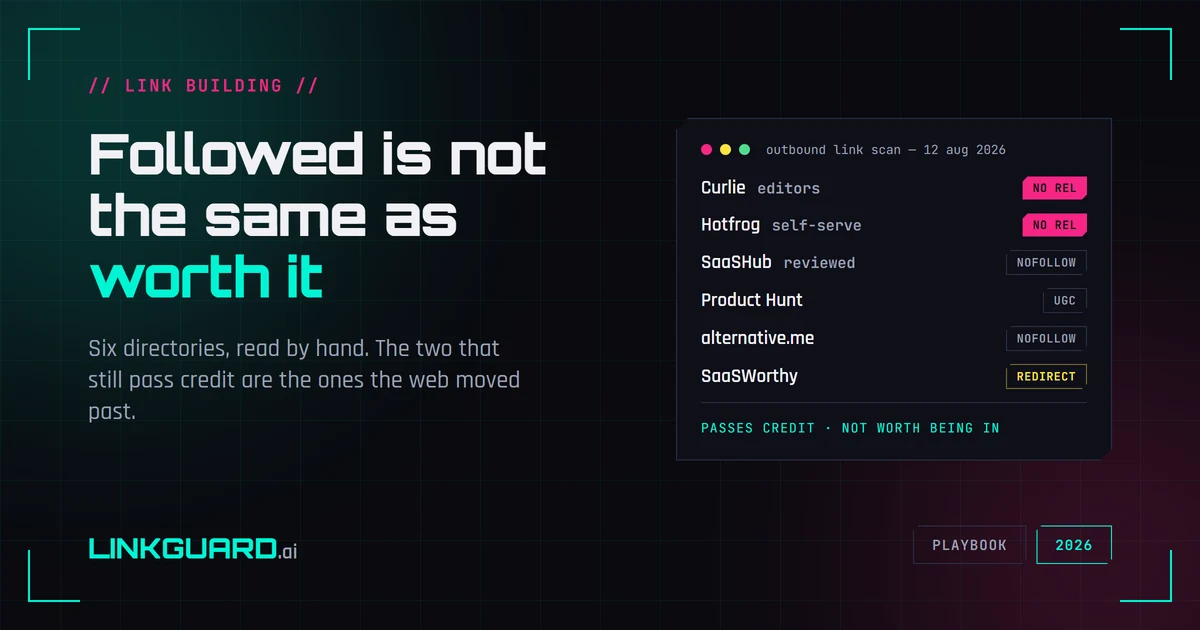
Google's spam policy names low-quality directory links as link spam. We opened six web directories and read the raw HTML: the two that still pass link credit are the general-directory survivors, while every vertical directory worth being listed in withholds it. What the tactic is still good for, and what to check once a listing is live.