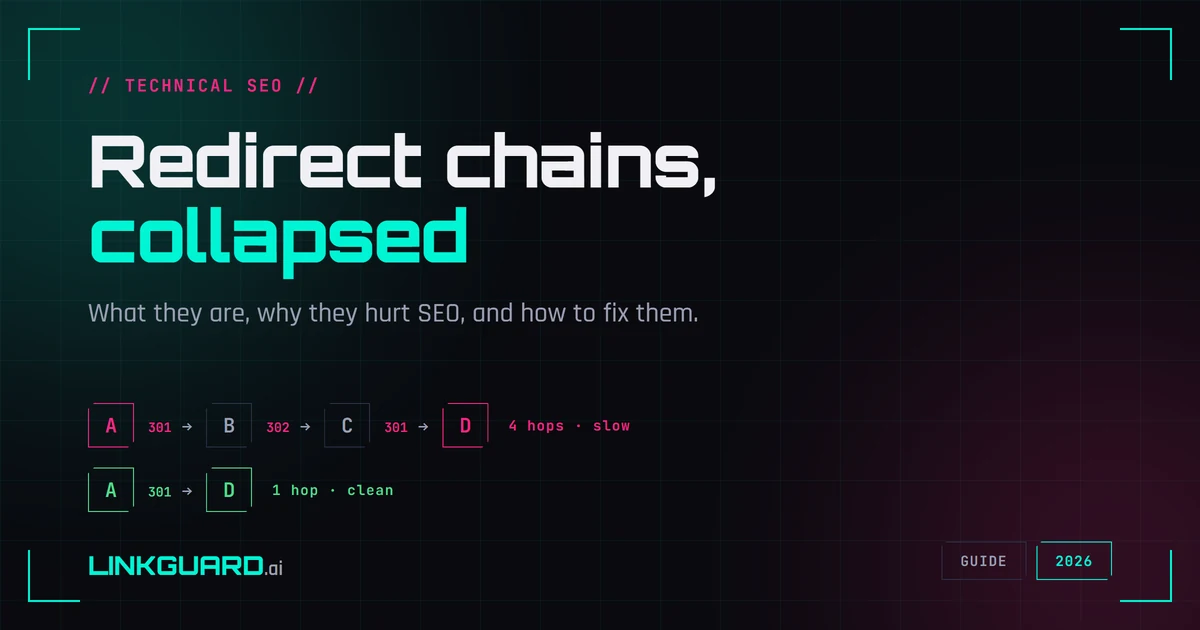
A page that used to rank stops showing up in Google. You check it: the URL loads fine, the content's all there, nothing looks broken. So why is indexing slow and traffic sliding? That's the maddening part — the page works, so you have nothing to point at when the client asks why traffic dropped. Then you open your browser's Network tab, reload, and watch four separate requests fire before the page finally appears: the old http:// URL bounces to https://, which bounces to a www version, which bounces to a trailing-slash version, which finally serves the page. Four hops to load one article. That's a redirect chain — a slow leak that never breaks loudly enough to notice, while the browser quietly hides it from you by following every hop on your behalf.
Here's the honest framing up front, because the topic is full of outdated scare-talk: redirect chains usually don't destroy your SEO, and since 2016 Google says they don't even leak link equity. What they do is waste crawl budget, slow your pages down, and stack up points of failure — and on a site mid-migration, they're one of the most common reasons indexing stalls. This guide explains what a chain actually is, what the status codes mean, what the real harm is versus the folklore, and how to collapse them. There's a free redirect checker at the end that traces every hop for you.
What a redirect chain is
A redirect is a server response that says "the thing you asked for lives somewhere else — go here instead." Your browser follows it automatically, which is why you usually never notice.
- A single redirect is one hop. You request URL A, the server sends you straight to the final page B.
A → B. This is fine. This is how redirects are supposed to work. - A redirect chain is two or more redirects strung together before you reach the live page.
A → B → C → D. Every arrow is another request, another round trip, another thing that has to go right. - A redirect loop is a chain that folds back on itself, so the page never resolves.
A → B → A. Your browser tries, tries again, and eventually gives up withERR_TOO_MANY_REDIRECTS. A loop is a chain that became a bug.
Chains rarely get built on purpose. They accumulate. You move from HTTP to HTTPS one year, add a www canonical the next, restructure your URL folders after that, and rebrand the domain two years later. Each change adds a redirect rule, nobody removes the old ones, and the rules stack. Five years of reasonable decisions become a four-hop chain on URLs you forgot existed.
The status codes, and why they're not interchangeable
Every redirect carries an HTTP status code. The code tells the browser, and Google, what kind of move this is. Four matter for SEO, and confusing them is where a lot of damage starts.
- 301 Moved Permanently. The page has moved for good. Google treats a 301 as a strong signal that the new URL should be the canonical one, and over time it swaps the old URL for the new in its index. This is what you want for a real move.
- 308 Permanent Redirect. Same permanent signal as a 301, but it preserves the request method and body (a
POSTstays aPOST). Mostly relevant for APIs and form submissions rather than ordinary content pages. - 302 Found. A temporary move. Google treats a 302 as a weak signal and keeps the original URL in its index, because you've told it the move is temporary. Use a 302 when you mean "this is short-term." Use it by accident for a permanent move, a very common server-config mistake, and you've told Google to keep indexing the old URL indefinitely.
- 307 Temporary Redirect. The method-preserving twin of a 302. Temporary, keeps the method and body intact. Like 308, it mostly matters for non-
GETrequests.
The practical version: permanent move → 301. Temporary move → 302. The 307/308 pair exists to remove an old ambiguity about whether a redirect could change a POST into a GET; if you're redirecting plain content pages, you'll almost always be using 301. The trap to watch is a chain that mixes types — a 301 that hops through a 302 — because the temporary link in the middle muddies which URL Google should treat as canonical. (The MDN redirect reference has the full method-handling detail if you need it.)
Does a chain leak link equity? Not the way you've heard
This is the claim you'll see most often, and it's outdated. For years the standard warning was "every redirect bleeds a little PageRank, so chains dilute your link equity." That stopped being true in 2016, when Google's Gary Illyes stated plainly that 3xx redirects no longer lose PageRank, and that this covers 301, 302, and the rest of the 3xx family. Link equity passes through. I haven't found any Google statement reversing that since, so as of 2026 it stands.
So if redirect chains don't leak ranking power, why collapse them at all? Because "no PageRank loss" only answers the ranking-signal question. It says nothing about the three things that actually make chains worth fixing:
They waste crawl budget. Every redirected URL Googlebot follows is a request it spends. A chain makes the crawler walk through several URLs to reach one page. On a small site this barely registers: if you have 200 pages, crawl budget is not your problem and anyone telling you otherwise is overselling. On a large site with hundreds of thousands of URLs, chains eat into how much real content gets crawled.
They add latency. Each hop is another round trip to a server before the page can even start loading. Google itself notes that chaining redirects adds latency. Four hops on a slow mobile connection is four sequential delays stacked in front of your content, which works against Core Web Vitals like LCP. The page isn't broken; it's just slower than it needs to be, on every single visit, forever, until you fix it.
And every hop is one more thing that can break. Each URL in the chain has to keep working. If a middle link gets deleted, misconfigured, or starts returning a 404 during some future migration, the whole path dead-ends. A single redirect can't half-break. A four-hop chain has four chances to.
There's also a hard ceiling: Google's crawlers follow up to 10 redirect hops by default. Past that, the destination is treated as unreachable and won't be indexed. You're unlikely to hit 10 by accident, but it's a real cliff. And there's a softer limit worth knowing: Google's John Mueller has said Googlebot may only follow around 5 hops in a single crawl attempt and finish the rest on a later visit, which is exactly why a long chain can stall indexing even when it technically resolves in a browser. He recommended keeping chains under 5 hops for that reason.
When chains bite: migrations and canonical mismatches
Redirect chains are most dangerous during the moments you're least watching them: site migrations and redesigns. That's when rules get written in bulk, old rules get left in place, and a 301 → 302 → 301 chain ships to production without anyone tracing a single URL end to end. If your pages stopped getting indexed after a migration, redirects are one of the first things to check — our site migration SEO checklist treats this as a named step, and the indexation troubleshooting checklist walks through it when a specific page won't index.
The other quiet failure is the canonical mismatch. If your redirects send Google to one version of a URL but your rel="canonical" tag points at another, you've given two conflicting instructions, and Google has to guess. Worth checking both at once after any URL change; our canonical tag checker reads the same pages your redirects are about to land on.
How to find your chains
You can't fix what you can't see, and a chain is invisible in a browser because the browser follows it silently. A few ways to make the hops visible:
- Browser DevTools, Network tab. Reload the page with "Preserve log" on. Each hop shows up as its own request with its own status code. Free, already installed, good for spot-checking one URL.
curl -IL <url>from a terminal.-Ifetches headers only,-Lfollows redirects, and it prints every hop's status code andLocationheader in order. The fastest option if you're comfortable in a shell.- Crawlers like Screaming Frog or Ahrefs Site Audit for whole-site sweeps. They'll export a redirect-chains report flagging every multi-hop path on the site. This is the right tool when you're auditing thousands of URLs, not one.
- Our free redirect checker when you want a clean trace of a single URL without installing anything or remembering curl flags. Paste a URL and it shows you every hop, each status code, and the final destination.
How to fix a chain
The fix is the same in every case, and it's simpler than the diagnosis: point the first URL directly at the final destination, in one hop.
If you have A → B → C → D, change the rule for A so it goes straight to D. Then do the same for B and C: B → D, C → D. Now anyone arriving at any old URL lands on the final page in a single 301, no walking the chain. This collapses the whole structure without breaking any of the old entry points.
Two things to do alongside it:
- Update your internal links. If pages on your own site link to A, change them to link to D directly. There's no reason to make your own crawler, or your own visitors, go through a redirect you control. This step alone removes most of the crawl cost.
- During a migration, map old to final in one move. When you're writing redirect rules in bulk, map each old URL straight to its final new URL. Don't route through an interim domain or an intermediate path that you'll then redirect again. Google's site-move guidance is explicit about keeping redirects to a single hop where you can.
That's the whole fix. No tooling, no guesswork — just collapse every chain to one hop and keep your internal links pointed at final URLs.
Frequently asked questions
What is a redirect chain?
A redirect chain is two or more redirects strung together between the URL someone requests and the page that actually loads — for example A → B → C. Each step is a separate server response that has to be followed before the visitor reaches the destination. A single, direct redirect (A → B) is not a chain and is perfectly fine.
Do redirect chains hurt SEO?
They don't leak link equity — since 2016 Google has said 3xx redirects pass PageRank through. The real harm is wasted crawl budget on large sites, added latency on every load, and extra points of failure. Long chains can also stall indexing, since Googlebot may only follow about 5 hops per crawl attempt and gives up entirely after 10.
What's the difference between a 301 and a 302 redirect?
A 301 is a permanent move: Google treats it as a strong signal to replace the old URL with the new one in its index. A 302 is temporary: Google keeps the original URL indexed and treats the redirect as a weak signal. Using a 302 by mistake for a permanent move is a common error that keeps the wrong URL in Google's index.
How many redirects will Google follow?
Google's crawlers follow up to 10 redirect hops by default. Beyond that, the destination is treated as unreachable and won't be indexed. Google's John Mueller has also said Googlebot may follow only around 5 hops in a single crawl attempt, so keeping chains under 5 hops is the safer target.
What is a redirect loop?
A redirect loop is a chain that points back to itself, so the page can never finish loading — for example A → B → A. The browser eventually stops with a "too many redirects" error (ERR_TOO_MANY_REDIRECTS). A loop is always a bug and needs to be fixed at the server-config level.
How do I fix a redirect chain?
Point the first URL directly at the final destination in a single redirect, and do the same for every intermediate URL. Then update your internal links to point at the final URL so crawlers and visitors never enter the chain at all. During migrations, map each old URL straight to its final new URL rather than routing through interim steps.
Trace your chains before they cost you
Redirect chains are the kind of problem that never announces itself. Nothing 404s, nothing errors, the page loads — it's just slower and harder to crawl than it should be, on every visit, until someone looks. The looking is the hard part, because a browser hides the hops by following them for you.
Run any URL through the free LinkGuard redirect checker. It traces every hop in order, shows you each status code, and gives you the final destination, so you can see a four-hop chain for what it is and collapse it to one. No login, nothing saved. Paste, run, read.
Collapse the chain and the page loads in one hop instead of four, the crawler stops walking dead URLs, and the page that quietly dropped has a clear path back. Better still, the next time someone asks why traffic slipped, you have the trace to point at, instead of a page that looks fine and a shrug.
Last updated: 2026-05-29. We re-check the redirect behavior described here against Google's current crawler documentation roughly every quarter; if the hop limits or canonical-signal rules change, this guide gets updated.
About the Author

Related Articles

How to find backlinks in Google Analytics 4 (it only shows the clicked ones)
GA4 has no backlink report. It counts referral sessions - visits that arrived from a link somebody clicked - so a removed link and an unclicked link produce the same empty row. The current click-path, why the referring URL arrives stripped to a domain, and the six blind spots.

How to check a backlink in Google search (we ran all four ways)
link:linkguard.ai returns 73 million results and not one backlink. What the retired operator, a quoted search, the page's own HTML and Search Console each actually prove.

Two schema validators, two verdicts: which one decides your rich result
The same page passes schema.org's validator with three items and no warnings, and Google's Rich Results Test with two. Nothing errored. One item is simply absent. Both tools are Google's, both are right, and only one of them is telling you what Google will actually show. Run on our own page, on 14 August 2026.