Monday, 9 AM. You open Google Search Console — traffic dropped 23%. No apparent reason. You start digging: maybe an update? Nope, competitors are stable. Content's still there. Links... now that's interesting. Turns out, three weeks ago your site started throwing 5xx errors at night when nobody's watching. Googlebot came, got a 503, left. And that went on for 21 days.
Sound familiar? It does to me. After that incident, I spent about 40 hours testing different technical SEO tools. Tested 47 platforms over a year and a half. Most of them — garbage. But some actually work.
In this article, we'll cover: which tools you need depending on your budget and team size, where you can save money without sacrificing quality, and — honestly — what I wouldn't spend money on knowing what I know now. Plus I'll show you real tool combinations that agencies actually use, without the LinkedIn posturing.
What actually falls under "technical SEO" (and why one tool won't save you)
Before you rush to buy Semrush for $140/month — stop. Let's figure out what exactly we're going to monitor.
Technical SEO isn't one task. It's at least six different areas:
Crawlability and indexation. Can Google even reach your pages? Are there endless redirects, sections blocked in robots.txt, or pages that only render via JavaScript?
Page speed. Core Web Vitals became a ranking factor in 2021, and Google's only been tightening the screws since. LCP, FID, CLS — if these acronyms give you a headache, you're not alone.
Structured data. Schema markup for rich snippets. Sounds simple until you start dealing with nested entities and reciprocal relationships.
Mobile version. Mobile-first indexing isn't a recommendation — it's reality. Google looks at your mobile version first.
Security and HTTPS. Mixed content, certificates, HSTS — small things that can cost you rankings.
And finally — link monitoring. But that's a separate topic, and we have a dedicated guide on backlink monitoring.
One tool won't cover everything. Attempts to find a "universal solution" usually end with paying $300/month for a platform that does everything mediocrely.
The free minimum: where to start if your budget is zero
Honestly? If you have fewer than 500 pages and you're just starting out — you can get by with free tools. Seriously. I know agencies that worked exclusively on free tools for their first two years.
Google Search Console — the foundation you can't skip
This isn't optional. It's mandatory. If you don't have GSC — go set it up right now.
What's actually useful:
- Index Coverage shows which pages Google sees and which ones it ignores
- Core Web Vitals straight from the source (not some third-party estimate)
- Crawl Stats — how many times the bot visited, what errors it encountered
- Manual Actions — if you get penalized, you'll know first
There are limitations. GSC shows data with a 2-3 day delay. Can't do a full site audit. Doesn't find technical issues before Google stumbles upon them.
But for free — there's nothing better.
Screaming Frog (free version up to 500 URLs)
This is where the magic starts. Screaming Frog is a desktop crawler that goes through your site and collects everything: title tags, meta descriptions, headings, canonical tags, status codes, redirects.
500 URLs free — that's enough for most small sites. One of my clients — a local dental clinic chain, 180 pages — has been running on the free version for three years now.
What it does well: finds broken links (both internal and external), shows duplicate titles and descriptions. Also detects redirect chains — when a link goes A → B → C → D, though it should go straight A → D. Plus heading structure analysis if you care about H1-H2-H3 hierarchy.
What the free version can't do: JavaScript rendering. If you have an SPA on React or Vue — you need the paid license at £199/year.
Google PageSpeed Insights
Free. Shows Core Web Vitals. Gives specific optimization recommendations.
But there's a catch — it tests one page at a time. For a 10,000-page site, manually running each one isn't an option.
Starter toolkit
GSC + Screaming Frog Free + PageSpeed Insights. Every two weeks you run the crawler, check GSC for indexation errors, selectively test speed on key pages.
It works. Up to a certain point.
When free stops being enough (and what to buy first)
One client — e-commerce with 12,000 SKUs — we tried working with free tools. Lasted four months. Then a domain migration happened, and we realized that checking redirects manually at 500 URLs per session is like scooping water out of a sinking boat with a spoon.
When do you know it's time to pay? Usually it's a combination: site outgrew 500 pages, JavaScript rendering appeared, or you need regular monitoring instead of quarterly one-off audits.
Sometimes you just do the math: an hour of my work costs $50, manual checks take 4 hours a month — that's $200. A $15/month subscription pays for itself in the first week.
First purchase: Screaming Frog License (£199/year)
If buying just one thing — this is it. £199 a year (~$250) — and you get unlimited crawling plus JavaScript rendering through Chrome integration.
But the main thing — scheduled crawls. You set up a schedule, and every week you get a fresh audit without manual work. You can compare crawls: what changed since last time, what new errors appeared. Integration with GA4, GSC, PageSpeed API — also out of the box, though GA4 setup took me about 40 minutes with some cursing (documentation could be better).
For this money — best price-to-function ratio on the market. I don't know a single mid-level+ SEO specialist who doesn't use Screaming Frog.
Second purchase: GTmetrix Pro ($156/year)
PageSpeed Insights is fine for one-off checks. But when you need to monitor performance regularly, from different locations, with change history — GTmetrix.
$13/month gets you monitoring from 26+ locations and alerts when performance drops. But the most useful thing — waterfall diagrams. When a page takes 8 seconds to load and you don't know why, waterfall shows: this Google Fonts font is blocking render, this image weighs 4 MB, this analytics script loads synchronously instead of async.
There's also video playback — literally a video of how the page loads for a user. Show it to the client — immediately clear why it's a problem.
Once this saved a client: GTmetrix alerted about Time to First Byte rising from 0.3s to 2.1s. Turned out the host moved the server to a different data center without warning. Without monitoring, we'd have found out a month later when traffic had already dropped.
Total for SMB: ~$400/year
Screaming Frog + GTmetrix + free GSC and PageSpeed Insights. Enough for 80% of projects.
Mid-range budget: when you need the "big three"
Okay, what if you have more money? If you work at an agency or in-house at a company with a tools budget?
Here's where the choice between the "big three" comes in: Semrush, Ahrefs, Moz. All three are Swiss Army knives that do keyword research, backlink analysis, and site audit.
Semrush ($139.95/month Business plan)
I worked with Semrush for three years. Here's my honest opinion.
What's good:
- Site Audit with 200+ checks — one of the best on the market
- Integration with GSC and GA4 out of the box
- Position tracking works reliably
- Interface is intuitive (important when showing clients reports)
What's not great:
- Price bites. $140/month is $1,680/year. For that money you could buy many targeted tools
- Backlink database is weaker than Ahrefs (this is widely acknowledged)
- Site Audit sometimes shows "issues" that aren't actually issues. For example, pages with low word count — not always a bug
When to choose it: if you need a universal tool and you're not ready to assemble a stack of 5-7 separate services.
Ahrefs ($129/month Lite, $249 Standard)
Ahrefs is the king of backlinks. Their link database is the largest and most up-to-date. For technical SEO this matters when analyzing competitors or checking your own link profile.
Site Audit — they have it too, and it's decent. But — subjectively — less detailed than Semrush.
When to choose it: if backlink analysis is the priority and technical SEO is supplementary.
Moz Pro ($99/month Standard)
Moz is like an old friend. Not the coolest, but reliable.
Site Crawl is simpler here. But they have unique metrics like Domain Authority that clients love seeing in reports. Plus — most affordable of the three.
When to choose it: limited budget + need basic functionality + work with clients who understand DA/PA.
My choice for an agency
If I were starting an agency from scratch and could only pick one platform — I'd go with Semrush. Not because it's perfect, but because it covers more tasks out of the box.
But in reality we use: Semrush (foundation) + Screaming Frog (deep technical audit) + Ahrefs (backlinks). Yes, there's overlap. Yes, we pay twice for some things. But each tool does its part of the work better than others.
Enterprise: when $300/month is pocket change
Now let's talk about big money. If you have a site with 1M+ pages, e-commerce with 50,000 SKUs, or you're an enterprise with international presence.
Lumar (formerly DeepCrawl) — from $32,000/year
Yes, thirty-two thousand dollars a year. And that's the starter plan.
What are you paying for? Speed. Up to 450 URLs/second — Screaming Frog would just collapse at those volumes. Crawl budget analysis, which is critical for large sites: where is Googlebot spending time, which pages does it scan more often, which does it ignore.
Plus segmentation by page types and GEO analysis for different locations. 24/7 monitoring with alerts — though honestly, we spent a week configuring alerts before we stopped getting daily false positives.
Real case: worked with a marketplace, around 800k pages (783k to be precise, but who's counting). Lumar found a problem we'd been hunting for two months: category pages were generating infinite URLs through filter combinations. Color × size × brand × price range = technically millions of combinations.
Googlebot was spending roughly 70% of crawl budget on these junk pages. We suspected this, but couldn't prove it without proper crawl analysis.
The fix took another three weeks — had to redo the filter logic and add canonicals. Then we waited for Google to re-index. In the end, after 4 months (not the quarter we promised the client) we saw organic growth of 31-34% depending on category. Some categories didn't grow at all — they had other issues.
Screaming Frog wouldn't have found this. Not because it's bad — it simply couldn't crawl that volume in reasonable time.
Botify — from $30,000/year
Botify takes a different approach. They analyze actual server logs to understand how Googlebot behaves on your site.
Not "how it would behave" (like crawlers do), but how it actually behaves.
This is critical for JavaScript-heavy sites. Because Googlebot renders JS differently than your Chrome. And differently than any emulator.
FastIndex — their feature for automatic page submission for indexing. For news sites where 50 articles are published every hour — gold.
Conductor — enterprise monitoring
Conductor acquired ContentKing (real-time SEO monitoring) and now offers a bundle: strategic SEO + operational monitoring.
For Fortune 500 companies this makes sense: one platform, one vendor, enterprise SLA with uptime guarantee.
For everyone else — overkill.
Specialized tools: what else to spend money on
Beyond the Swiss Army knives, there are point solutions. Sometimes they work better than the corresponding module in Semrush.
Structured data: Google Rich Results Test + Schema Markup Validator
Both free. Enough for 90% of tasks.
If you need automation on WordPress — Rank Math ($39/year) generates schema out of the box better than Yoast. Tested on real projects: rich snippets appear more often.
Hreflang: specialized validator
If you work with multilingual sites — hreflang can become a headache. Screaming Frog can check, but for deep analysis there's Alex Bobes' Hreflang Validator (free).
It finds what Screaming Frog shows but not as clearly: missing reciprocal links (when page A points to B, but B doesn't point back to A), invalid ISO codes, self-referencing issues.
Sounds like a small thing? For a site with 15 language versions — critical. One missed reciprocal link can cost rankings in an entire region.
Log file analysis: Screaming Frog Log File Analyser
£99/year separate from the main license. Or free up to 1000 records.
Why? To see what Googlebot actually does on your site. Which pages it scans, which it ignores. Where it encounters errors.
This is advanced-level. But if organic is your main channel and the site is large — must have.
What I wouldn't buy (personal anti-rating)
Okay, I promised to be honest. Here's what I spent money on and regretted.
Paid broken link checkers (separate services). Screaming Frog does this better and free up to 500 URLs, or for £199 unlimited.
SEO plugins with "AI recommendations" for $50/month. In 8 out of 10 cases the advice is either obvious ("add keyword to title") or outdated ("keyword density should be 2-3%").
Enterprise plans when Pro is enough. I've seen agencies paying for Semrush Guru ($249/month) using 10% of the functionality. Business at $140 would've been more than enough.
Cheap "all-in-one" platforms for $30/month. They exist. And usually do everything equally poorly. SE Ranking is an exception, but that's $52/month minimum.
Ready-made tool combinations (copy-paste for your situation)
Okay, enough theory. Here are specific recommendations — but remember these are starting points, not dogma.
Freelancer / small site (budget: $0-250/year)
All free: GSC + GA4 + Screaming Frog Free + PageSpeed Insights. If on WordPress — add Rank Math Free.
This is enough for sites up to 500 pages without complex JS. A freelancer I know runs 8 clients this way and has been doing so for two years. Says he doesn't need paid tools — clients are small, tasks are simple.
SMB / in-house marketer (budget: $400-800/year)
ToolPricePurposeScreaming Frog License£199/yearFull technical auditGTmetrix Pro$156/yearSpeed monitoringRank Math Pro$39/yearSchema + on-page (WordPress)GSC + GA4$0Foundation Total: ~$450/year. Covers 85% of tasks for mid-size business.
Agency (budget: $2,000-4,000/year)
This is where compromises begin. Ideal stack: Semrush ($1,679/year) + Screaming Frog (£199) + Ahrefs Lite ($1,548). Total ~$3,500.
Yes, there's overlap — both Semrush and Ahrefs can do Site Audit. But Semrush is better for client reports (nice PDFs, white label), and Ahrefs — for link analysis. Screaming Frog — for deep technical digging when you need to find a specific problem.
You can save by dropping Ahrefs. Will be ~$1,900/year. Works, but when a client asks "where did the competitor get that profile?" — your answer will be less accurate.
Enterprise
They don't even ask about budget. Lumar or Botify — from $30k/year. Plus Screaming Frog for ad-hoc tasks, GSC + GA4 mandatory, Conductor if you need real-time monitoring.
At this level you're not buying tools, you're buying problem solutions: scale, speed, integrations with internal systems, enterprise SLA with uptime guarantee.
How to evaluate what works (and when to switch tools)
Bought a tool — now what? How do you know if it's paying off?
Here are the metrics I look at:
Time to diagnose a problem. If finding the cause of a traffic drop used to take 4 hours and now takes 30 minutes, the tool is working.
Number of problems found before they affected traffic. The ideal tool alerts about an issue before you notice it in GSC.
Client onboarding time. If you can set up monitoring for a new client in an hour instead of a day — that's savings.
When to switch tools? Usually when you've outgrown the limits — by URLs, projects, or users. Or when tasks appear that your current tool simply can't handle. Sometimes — when you find something better for the same money, but that's rare: usually "better" turns out to be marketing, not reality.
Don't switch tools just because some blogger called a new platform a "Semrush killer." Every migration means lost time and data.
What to do after reading this
If you've read this far — you're serious about technical SEO. That's already half the battle.
Here's what I'd do in your place. Today — check that GSC and GA4 are set up and working. If not — that's first priority, everything else can wait.
This week — run your site through Screaming Frog. The free version is enough for a first audit. Look at 4xx and 5xx errors, broken links, duplicate titles. Usually something unexpected turns up.
If the site is large and the free version isn't enough — buy the license. £199 a year is less than one day of your work costs. Seriously, I know people who "saved" on tools for years and spent hours on manual checks. That's false economy.
And in a couple months, when you understand what data you're missing — then think about Semrush or Ahrefs. Not before.
And yes: tools are means, not ends. The best tool is the one you actually open and use. An expensive Swiss Army knife gathering dust in your bookmarks is worth nothing.
Useful links
About the Author

Related Articles

How to find backlinks in Google Analytics 4 (it only shows the clicked ones)
GA4 has no backlink report. It counts referral sessions - visits that arrived from a link somebody clicked - so a removed link and an unclicked link produce the same empty row. The current click-path, why the referring URL arrives stripped to a domain, and the six blind spots.

How to check a backlink in Google search (we ran all four ways)
link:linkguard.ai returns 73 million results and not one backlink. What the retired operator, a quoted search, the page's own HTML and Search Console each actually prove.
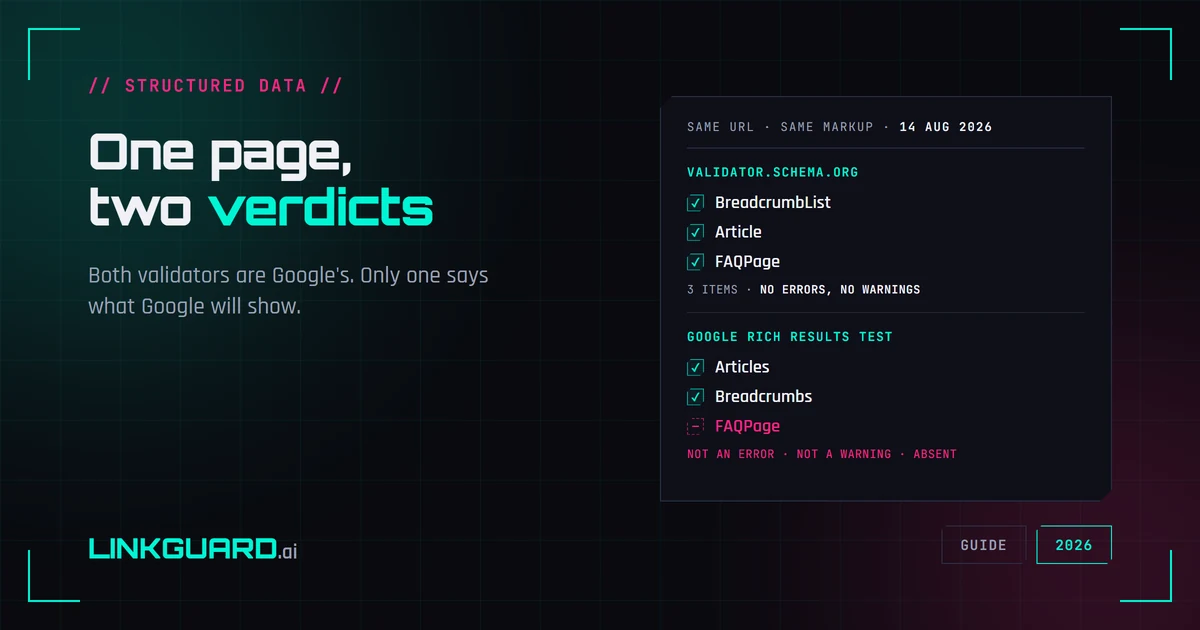
Two schema validators, two verdicts: which one decides your rich result
The same page passes schema.org's validator with three items and no warnings, and Google's Rich Results Test with two. Nothing errored. One item is simply absent. Both tools are Google's, both are right, and only one of them is telling you what Google will actually show. Run on our own page, on 14 August 2026.