You've been building links to one page for months. A couple you paid for. Your monitor checks each one and they all come back green — live, dofollow, the anchor you asked for. And the page still won't climb. So you build more links. Still nothing.
Then you open Search Console and actually look at the page itself, and there it is: not indexed. Somewhere along the way your own page fell out of Google's index — a noindex that slipped in during a redesign, a thin-content cull, a migration that didn't redirect cleanly — and nothing told you. Every link you aimed at it has been pushing on a page Google quietly stopped keeping.
That's a different problem from the one most "is my backlink indexed" advice solves, and it's the one almost nobody checks for. Here's what's actually going on, how to catch it by hand, and how to stop checking by hand once you have more than a few pages to watch.
Short on time? If you'd rather not check this by hand, here's how connecting your Search Console watches your target pages for you and flags one the day it drops.
Two kinds of "indexed", and why they get mixed up
When people ask whether a backlink is indexed, they usually mean the donor page — the page your link sits on. If Google hasn't indexed that page, it hasn't seen your link, so the link passes nothing. Fair question, and there's a free backlink index checker for exactly that.
But every backlink has a second page, and it's the one people forget: the target — your page, the one the link points to. The donor page can be perfectly indexed, your link sitting there in Google's records, equity flowing into a target page that isn't in the index at all. When that happens the equity has nowhere to land. The page can't rank, because Google isn't keeping it at all.
Both ends have to be indexed for a link to do its job. The donor, so Google sees the link. The target, so the page it feeds is actually in the running. Guides obsess over the first. The second is the quiet one, and it's usually a page you own — which means it's on you to notice.
How your own page drops out of the index
Pages rarely fall out for dramatic reasons. It's almost always something small and self-inflicted:
- A
noindextag that crept in — a staging template pushed live, a plugin default, a "temporary" block nobody removed. - A migration where the old URL now 404s or redirects somewhere wrong, and the new one never got crawled properly.
- Google reassessing the page as thin or duplicative and dropping it on a refresh — the "Crawled, currently not indexed" verdict that frustrates everyone.
- A canonical tag pointing the page at a different URL, so Google folds it away and keeps the other one instead.
None of these touch your backlinks. The link is still live on the donor's page. Your monitor still says green. The page just isn't in the index any more — and the only place that fact shows up plainly is Search Console.
The one-minute check, by hand
For a single page you don't need anything but Google. Type site:yoursite.com/the-page into search. If the page comes back, it's indexed; if nothing comes back, that's a warning sign. It's a strong signal, not proof — Google sometimes hides site: results for low-priority pages — so read an empty result as "go check properly", not a verdict.
The authoritative check, for pages you own, is URL Inspection in Google Search Console. Paste the full URL into the bar at the top and Google tells you straight: "URL is on Google" or "URL is not on Google", with the reason. No proxy, no guessing. That's Google answering about your own page — which it will only do for properties you've verified.
That's the whole method for one page. The trouble starts when you have fifty.
Why checking by hand quietly fails
I'll be honest about why this gets missed: it's boring, invisible work with no deadline. Nobody blocks out a Tuesday to re-inspect every target page in Search Console. The link monitor's green, traffic is whatever it is, and a page slipping out of the index sends up no flare at all. You find out months later, by accident, usually while looking for something else.
And the cost compounds. Every link you build to that page in the meantime — every outreach email, every paid placement — is spent on a page that can't bank it. The links aren't bad. They're pointing at a closed door.
Checking it automatically, with your own Search Console
This is the part LinkGuard was missing for a long time, and the reason I wired Search Console in. When you connect your own GSC, read-only, LinkGuard takes the target pages your monitored links point to and runs them through that same URL Inspection check on a schedule — so a page of yours dropping out of the index becomes an alert, not a six-months-late discovery.
It's your data, asked of Google directly. Not a site: guess, not a third-party crawl — the actual index verdict for your pages, sitting next to the links that depend on them. When the answer flips from indexed to not, you hear about it while there's still time to fix the page instead of pouring more links into it.
The honest limits, so nothing surprises you: this covers pages under a property you've verified — your own. It can't tell you whether a donor's page, which you don't own, is indexed, because Google only answers index questions for sites you control. For the donor side you're back to the index checker and the site: method. And Google caps URL inspections per day, so a very large set of pages is checked in batches, not all at once.
What to do when a target page has dropped
Once you've caught it, the fix is usually undramatic:
- Look for a stray
noindexfirst — in the page's<head>and in the HTTP headers. It's the most common cause and the easiest to miss. - Make sure the URL returns a clean 200 (not a redirect or a soft 404) and that its canonical points to itself.
- If the verdict is "crawled, currently not indexed", the page has to earn its place back — real content, a few internal links from pages Google already keeps, a spot in the sitemap.
- Then request indexing in Search Console and wait. If the page was also ranking and has slipped, deindexation is only one candidate — where it sits in a ranking-drop investigation is worth knowing before you chase it. You can't force it, but a page that deserves to be indexed usually gets there.
The backlinks you already built start working again the moment the page is back in the index. That's the upside of catching it: nothing's lost for good, as long as you notice in time.
Questions people ask
Does an unindexed target page mean my backlinks are wasted?
While the page is out of the index, effectively yes. The links are still live and still pointing at the page, but Google won't rank a page it isn't keeping, so the equity has nowhere to land. The moment the page is indexed again, those same links start counting. It's lost for as long as the page is out, not permanently.
How is this different from checking if a backlink is indexed?
"Is my backlink indexed" almost always means the donor page — the page your link sits on — which Google has to index before it can see your link. This is the other end: whether the page your link points to, your own page, is in the index. Both have to be indexed for the link to work. The donor side you can check with a free index checker; the target side, authoritatively, only your own Search Console can answer.
Can I check whether a page I don't own is indexed?
Only loosely. For a page you don't control, a site: search is the best outside signal, and our free backlink index checker runs that for you. URL Inspection — Google's authoritative answer — works only for properties you've verified in Search Console, so a donor's true index status is something only the donor's owner can pull.
Why would Google drop a page it already indexed?
Usually something changed on the page or the site: a noindex tag was added (often by accident), the page started returning an error or a redirect, a canonical now points elsewhere, or Google reassessed it as thin on a crawl and chose not to keep it. De-indexing is rarely a penalty — more often it's a quiet signal that the page, as it stands, isn't earning its slot.
How often should I check that my pages are still indexed?
For pages you're actively building links to, more often than you will by hand — which is the whole problem. Once a week is plenty if you'll actually do it. If you won't, that's the case for letting something watch the target pages your links point to and tell you when one drops, instead of trusting yourself to remember.
About the Author

Related Articles

Expired domain backlinks decay before the auction closes
Policy requires an expired .com to resolve to nothing for weeks before anyone can buy it. The links you're bidding on were counted before that, by a crawler that hasn't been back.

PBN backlinks don't fail one at a time
Google's spam documentation never uses the word. What a network link actually is in 2026, which footprints still identify one, and why four of them tend to go in the same week.
Directory submission in 2026: what a listing is actually worth
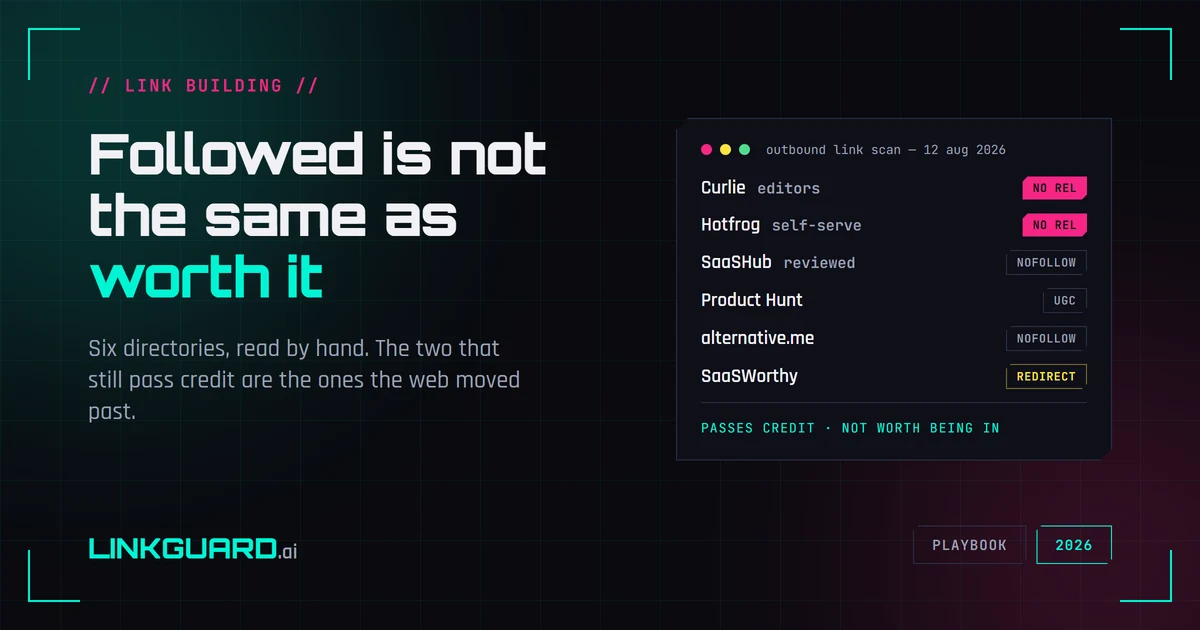
Google's spam policy names low-quality directory links as link spam. We opened six web directories and read the raw HTML: the two that still pass link credit are the general-directory survivors, while every vertical directory worth being listed in withholds it. What the tactic is still good for, and what to check once a listing is live.