Your monitor pings "link lost." You open the donor page, and the link is sitting right where you placed it, still dofollow, still in context. The tool isn't broken and you aren't imagining it. This is a false positive, and on modern websites it's common enough to quietly erode your trust in monitoring altogether. Here's why it happens, what it costs you, and how to stop chasing ghosts.
What a false positive is in backlink monitoring
A false positive is when a monitor reports your backlink as removed, switched to nofollow, or de-indexed when the link is fine. The alert fires, you react, and there was nothing to react to. A few of these and you start treating every alert as noise, which is the real danger: the day a link does disappear, the warning looks like all the false ones before it. Accurate monitoring isn't only about catching losses. It's about not crying wolf, so that when the tool does raise its voice, you believe it. And these aren't rare edge cases anymore. As more of the web renders its content in the browser, false positives have become the default failure mode of older monitoring tools. It's worth understanding where they come from before you trust, or distrust, an alert.
Why it happens: a plain fetch can't see JavaScript
Most monitors check a link by sending one HTTP request and reading the HTML that comes back. On a classic server-rendered page, the full article, including your link, is right there in that response, and the check works.
A growing share of the web doesn't work that way. On sites built with Webflow, Framer, React, or Next.js, the first HTML response is often a near-empty shell. The real content, and your link inside it, gets injected by JavaScript a moment later, in the browser. A plain fetch never runs that JavaScript. It sees the shell, finds no link, and reports it lost, even though a human (and Google's renderer) would see the link load a half-second later. The monitor isn't wrong about what it fetched. It's just looking at the wrong version of the page.
A quick before-and-after
Picture a guest post on a Framer site. A plain monitor requests the raw HTML, and the body comes back as a skeleton: a header, a footer, and an empty <div id="root"> where the article should be. Your link is nowhere in it. The monitor marks the placement lost and fires an alert.
Now load the same URL in a browser. A fraction of a second later, JavaScript fills that empty div with the full post, your paragraph, and your dofollow link, exactly as you placed it. Two requests to the same page, two completely different answers, and the only difference is whether the JavaScript ran. A monitor that never runs it will be wrong on this page every time it checks, and it will be just as confidently wrong tomorrow.
Google renders JavaScript. Your monitor should too.
Google itself renders JavaScript before it indexes a page, and that settles most of the argument. Its Web Rendering Service loads the page, runs the scripts, and reads the final, hydrated DOM: the same content a visitor sees. So a link injected by JavaScript on a Webflow or React donor page is, as far as Google is concerned, a normal, countable backlink that passes equity like any other.
That means a plain-fetch monitor is holding your links to a stricter test than Google does. It flags as "lost" the very links Google reads as live, while the placement keeps doing its job in the rankings. You end up reacting to a problem the search engine never saw. If the tool meant to protect your backlinks judges them more harshly than the algorithm they exist for, it's measuring the wrong thing, and sending you to chase the wrong problems.
Which pages trigger false "lost" alerts most
If your placements live on any of these, expect plain-fetch monitors to misfire:
- Visual builders like Webflow and Framer, which hydrate content with JavaScript.
- React, Vue, Next.js, and Nuxt single-page apps that render client-side.
- Lazy-loaded or infinite-scroll articles where the body appears only as you go.
- Links inside JavaScript-injected blocks: "related posts" widgets, comment systems, or anything added through Google Tag Manager.
- Pages behind a cookie or consent wall that withhold content until you interact.
Plain server-rendered blogs and most WordPress sites are usually safe, so a portfolio of classic publisher placements may never trip a single false alarm. The trouble scales with how modern, and how JavaScript-heavy, the donor sites in your portfolio are. One guest post on a Framer site can throw a false "lost" alert on every check, while the WordPress link next to it never does. The more your link building leans toward startup blogs, SaaS sites, and design-forward publishers, the more of these you should expect.
Why this keeps getting worse
This isn't a problem that's fading out. It's growing. Visual builders like Webflow and Framer have moved from niche to mainstream, and agencies and SaaS brands now ship marketing sites as React or Next.js apps by default. More page furniture is injected through tag managers after load too: related-posts blocks, author bios, comment threads. Every one of those trends puts more links behind JavaScript.
So a plain-fetch monitor doesn't stay as accurate as it was when you signed up. It quietly degrades as the web modernizes around it, and the share of your portfolio it can't read correctly creeps up year over year. A checker that ignores JavaScript was already behind the web in 2026, and the gap widens every quarter. Picking a tool that renders isn't a nice-to-have for the future; it's catching up to where the web already is.
What false positives cost you
I spent years building and monitoring link portfolios for clients, and false positives were the failure mode that wasted the most of my week. The obvious cost is time. Every phantom alert pulls a senior link-builder into opening the page, scrolling, and confirming a link that was never gone, fifteen minutes that bought nothing. On a portfolio of a few hundred links across modern donor sites, that can mean, in our experience, a handful of false alarms a week and roughly an hour or two of senior time a month spent proving nothing happened. Worse is the outreach: emailing a publisher to ask why they "removed" a link that's still live makes you look careless and burns goodwill you'll want the next time you need a favor.
The quiet cost is the worst. After enough false alarms, your team stops trusting alerts and starts skimming past them. That's when a real removal slips through, sitting unread in the same inbox as the noise. And it surfaces where it stings: the client who watches a ranking dip and asks why nobody caught the lost link, or the in-house SEO with no clean answer in the Monday review. A monitor you can't trust doesn't just waste time. It trains you to ignore the one warning that mattered.
How to tell a false positive from a real loss
When an alert fires, you can confirm it in under a minute. Open the donor page in a normal browser and use Ctrl+F to search for your URL or anchor. If it's there, the link is live.
To see what your monitor saw, press Ctrl+U for the raw page source, the unrendered HTML. Then open your browser's Inspect panel, which shows the live, JavaScript-rendered DOM. If your link appears in Inspect but not in the raw source, that's the tell: the link loads via JavaScript, and a plain-fetch monitor will keep reporting it lost. For redirect-related "losses," a quick trace through every hop helps too. Our free redirect chain checker shows where a URL ends up.
How to fix it: render the page before you judge
The fix is to check a link the way a browser, and Google, sees it: run the page's JavaScript first, then look for the link. A real-browser check renders the full page before deciding anything, so a JavaScript-injected link is found instead of falsely flagged.
Not every monitor does this. Many are plain-fetch only, which is why false "lost" alerts are so common across the category (it's a shared limitation, not one vendor's failing). LinkGuard falls back to a real cloud browser when a plain fetch returns an empty or suspicious result, so JavaScript-rendered links are verified as they appear. To be straight about it: this removes the single biggest source of false positives, not all of them. No checker is perfect, and we'd rather say so than promise zero. If you're weighing tools, our roundup of backlink monitors notes which ones render JavaScript and which don't.
What to look for in a monitor
If false alerts are your problem, three things matter more than feature count:
- JavaScript rendering. Does it run the page in a real browser, or just read the first HTML response? This is the whole ballgame for modern donor sites.
- Verify before alerting. Good monitors re-check a suspicious result before raising an alarm, instead of crying lost on the first miss.
- Show you what it saw. When it does flag a link, it should let you see the evidence so you can judge fast.
And the honest flip side: if every link you own sits on a plain, server-rendered site, a basic monitor may serve you fine. Don't pay for rendering you don't need.
Questions people ask
What is a false positive in backlink monitoring?
It's when a monitor reports your link as removed, nofollowed, or de-indexed while the link is live and unchanged. The check fired on bad information, usually because it couldn't see the real, rendered page.
Why does my monitor say a live link is lost?
Most often because the donor page renders its content with JavaScript. The monitor fetched the raw HTML, which didn't yet contain your link, and concluded it was gone. Open the page in a browser and the link is there.
Do all backlink monitors have this problem?
Any monitor that reads only the first HTML response will misfire on JavaScript-rendered pages. Monitors that render the page in a real browser before checking avoid most of it. It's a property of how the tool fetches, not of the brand name.
How do I check if a "lost" link is gone for good?
Open the page in a browser and Ctrl+F for your URL. Compare the raw source (Ctrl+U) with the rendered DOM (Inspect): if the link is in the DOM but not the source, it's a JavaScript false positive, not a real removal.
Will Google still count a JavaScript-loaded backlink?
Yes. Google renders JavaScript before indexing, so a link injected client-side is read and counted like any link in the raw HTML. The catch is that some monitoring tools don't render, so they report a link as missing that Google is happily counting in your favor.
Is this the same as a "soft 404" or a redirect problem?
No, though they're cousins. A JavaScript false positive is about the link not appearing in the unrendered HTML. Redirect and soft-404 issues are about where a URL resolves to. Both can look like a "lost" link in a report, which is why it pays to confirm the cause before you act. Trace redirects with a redirect checker; confirm rendering by comparing source to the live DOM.
Does LinkGuard eliminate false positives?
It removes the biggest cause, JavaScript rendering, by falling back to a real cloud browser. It reduces false positives sharply rather than promising zero, because no automated check is flawless and we won't claim otherwise.
Related reading
- Best backlink monitoring tools in 2026, with which ones render JavaScript.
- LinkGuard vs Linkwatcher, on subscription versus pay-as-you-go monitoring.
- Free redirect chain checker, to trace a URL through every hop.
If your placements live on Webflow, Framer, or React sites and you're tired of phantom "lost" alerts, LinkGuard renders each page in a real browser before it decides. The next "lost" alert you get is then one worth acting on, because the phantom ones never fired. You pay only for the checks you run, with no monthly subscription. Start free with 1,000 tokens, no credit card, and see how the checks read on your own links.
About the Author

Related Articles

How to find backlinks in Google Analytics 4 (it only shows the clicked ones)
GA4 has no backlink report. It counts referral sessions - visits that arrived from a link somebody clicked - so a removed link and an unclicked link produce the same empty row. The current click-path, why the referring URL arrives stripped to a domain, and the six blind spots.

How to check a backlink in Google search (we ran all four ways)
link:linkguard.ai returns 73 million results and not one backlink. What the retired operator, a quoted search, the page's own HTML and Search Console each actually prove.
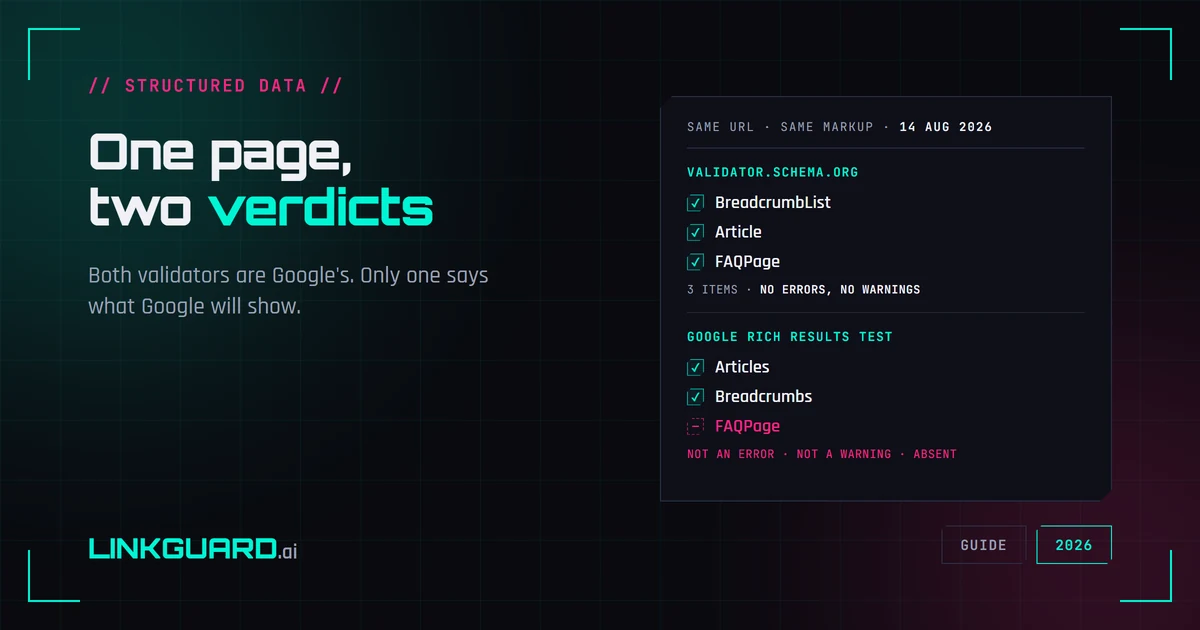
Two schema validators, two verdicts: which one decides your rich result
The same page passes schema.org's validator with three items and no warnings, and Google's Rich Results Test with two. Nothing errored. One item is simply absent. Both tools are Google's, both are right, and only one of them is telling you what Google will actually show. Run on our own page, on 14 August 2026.