You open your analytics on Monday. Direct traffic is flat. Organic is creeping down. And somewhere in a Slack thread, your CEO has just forwarded an article titled "How AI is killing publishers" with "are we doing anything about this?"
You're not sure. You added GPTBot to your robots.txt last summer because someone on LinkedIn said you should. ClaudeBot you forgot about. PerplexityBot you've never heard of. Google-Extended you set to Disallow six months ago, and now you're wondering if that's why your AI Overview citations dried up.
This is the block AI bots in robots.txt question every B2B team is suddenly having, and most of the "always block" advice on LinkedIn comes from people who can't tell you the difference between GPTBot and ChatGPT-User. Those two user-agents do opposite things. Blocking one is a content-policy decision; blocking the other breaks a feature your readers might use tomorrow. This article walks through what each named bot does, who controls it, and the honest tradeoff for blocking each one. We'll cover the part most hot-takes leave out: the difference between training crawlers, answer crawlers, and user-triggered fetchers, and why the Google-Extended decision is not what most articles tell you. At the end, there's a decision guide and a free robots.txt tester that knows the right user-agent names.
The boring truth about "blocking AI bots"
Robots.txt is a polite request, not a wall. It's a plain-text file the crawler is supposed to check before fetching anything. The well-behaved ones read it and obey: Googlebot, Bingbot, GPTBot, ClaudeBot, PerplexityBot, Google-Extended. The ones you'd want to keep out (scrapers, content-cloners, anyone selling your articles as "AI-rewritten unique content") don't even open it.
If your content was on the open web before mid-2023, it's already in the training data. Common Crawl has been scraping the web since 2008. GPT-3 was trained partly on Common Crawl. So was GPT-4. So was Claude. So were the early versions of every major model. Adding Disallow: / for CCBot in 2026 protects nothing that was indexed before; it only protects what you publish from this point forward.
The real question isn't "can I un-train models on my old content" (you can't). It's: what do I want these crawlers to do with my new content, going forward?
Each of these bots does a different job — that's the part most guides miss
The five bots people argue about are not interchangeable. They fall into three groups, and the group decides the tradeoff.
Training crawlers
They fetch your pages to be folded into the next model. They don't send users to your site. Blocking them costs you nothing today. The catch: they're also the bots most likely to be the reason a future ChatGPT answer mentions your brand at all.
GPTBot: OpenAI's training crawler. Announced August 2023.ClaudeBot: Anthropic's general crawler (training + index).CCBot: Common Crawl. Not "an AI", but its archive feeds dozens of model providers.Google-Extended: only controls Google's Gemini and Vertex AI training. It does not affect AI Overviews. (More on that in a second.)
Answer / index crawlers
They fetch your pages so an AI product can cite you in a real-time response. Different mechanic, different tradeoff.
PerplexityBot: builds Perplexity's index. Citations on Perplexity are clickable.OAI-SearchBot: OpenAI's index for ChatGPT search. Also clickable.
User-triggered fetchers
When a specific user asks ChatGPT or Claude to "go read this page," that fetch comes from a different user-agent. Blocking it means a user trying to share your article with their AI assistant gets a polite "I can't access that site" reply. That's friction you don't want.
ChatGPT-User: fires only when a user pastes your URL into ChatGPT.Claude-Web/Claude-User: same thing for Claude.Perplexity-User: same for Perplexity.
One detail most guides get wrong about Google-Extended: it does not block AI Overviews. AI Overviews are generated from the regular Google index. The bot that builds that index is plain old Googlebot. If you Disallow: Googlebot, you've left Google search entirely. If you Disallow: Google-Extended, you've opted out of Gemini training and kept AI Overview eligibility — the Google Search Central documentation confirms this, though the wording still trips careful readers. The first version of this article got it wrong too; we re-checked the docs and rewrote the section before publishing.
Why publishers are blocking — and what it costs them
The case for blocking is straightforward and emotionally satisfying: someone built a $10B company by scraping your archives, and now they're answering questions your readers used to come to you for. The New York Times, Reuters, BBC, Stack Overflow — all of them either block GPTBot outright or have explicit licensing fights with OpenAI. None of them are wrong to do that.
The cost lives in a graph that doesn't exist yet. When a researcher asks Claude "what's the most accurate way to monitor backlinks at scale," Claude pulls from whatever sites it trained on. If you blocked the training crawler, you're not in that pool. You might still get cited if a real-time search bot can reach you. You might not.
The honest framing: blocking training crawlers protects you from being digested into a competitor product. Allowing them buys you a non-zero chance of being named in a future product. Both are reasonable. Neither is free.
Watch the brand-mention number: per Wellows' brand-mention-vs-citation analysis, brand mentions correlate with AI visibility roughly three times as strongly as backlinks do. If your content strategy depended on becoming a citable source, blocking the training crawlers is a bigger sacrifice than it looks on paper.
Why some sites are leaving them open — and where that backfires
SaaS marketing sites, technical docs, open-source projects, agencies — almost all of these are leaving everything open. The logic: they're not selling articles. They're selling tools, services, or expertise. Every ChatGPT answer that mentions them by name is free top-of-funnel.
This is the strategy LinkGuard runs. Our robots.txt allows every named AI crawler. We'd rather Claude know what donor_domain_profiles is in our backlink-monitoring context than protect a marketing post that's already public anyway.
Where the open strategy backfires: when the AI gets your product wrong. Two failure modes I've seen described in SaaS communities, not from our own data yet:
- The model confidently quotes a feature you don't have, or a price you killed two years ago. Anyone who tries to use that "feature" leaves angry.
- A listicle-style answer ("best tools for X") lumps you in with three competitors and your real differentiator is invisible. The user picks whoever sounds simplest.
Neither failure mode is a reason to slam the door. They are the reason "allow all, never check what they say about you" isn't a complete strategy. You also need to monitor what AI says about your brand, and that's a separate tool and a separate problem.
How to decide based on what you sell
There's no universal answer. There's a decision keyed to what your site is. Here's the one I'd ask a founder over coffee:
You're an ad-supported publisher or paywalled journalism. Block training crawlers — GPTBot, ClaudeBot, CCBot. Block Google-Extended (you're not earning ad revenue from Gemini training). Allow Googlebot (you still want Google search). Decide case-by-case on the user-triggered fetchers; many publishers allow those because the user already chose to read your site.
You're a SaaS company. Allow all of them. Your acquisition channel is "someone asks an AI which tool to use" — and it happens hundreds of times a day. Be in the pool. (This is also the GEO vs SEO question we wrote about last month, and the answer there is the same.)
You're an agency or consultancy. Same as SaaS, with one exception — never publish your most proprietary case-study numbers in pages you don't want digested verbatim. Keep the real numbers behind an email gate. The educational layer can stay open.
Affiliates are where it gets ugly. AI answers are increasingly the disintermediator that used to be search. If your content is "10 best X" listicles with no original research, your traffic will likely keep eroding regardless of what you put in robots.txt. The honest answer here is: invest in original data, not in Disallow: rules. Robots.txt isn't going to save thin content.
Open-source projects and documentation sites should leave everything open. You want to be the canonical answer when somebody asks an AI how to use your library. The downside is roughly zero.
A reminder: even when you "allow", you can still block specific sections — /admin/, /staging/, anything generated dynamically that you don't want hallucinated about. Most common traps happen because someone disallows / for one bot and accidentally takes their pricing page out of two AI products at once.
Copy-paste starting points by site type
These are starting points, not finished policies. Read them, adapt the path list, and run the result through the tester before saving.
B2B SaaS / docs / open-source — allow everything:
User-agent: *
Disallow: /admin/
Disallow: /api/internal/

Sitemap: https://yoursite.com/sitemap.xml
Publisher / paywalled journalism — block training, keep search:
User-agent: GPTBot
Disallow: /

User-agent: ClaudeBot
Disallow: /

User-agent: CCBot
Disallow: /

User-agent: Google-Extended
Disallow: /

User-agent: *
Disallow: /admin/

Sitemap: https://yoursite.com/sitemap.xml
Agency / consultancy — allow, but wall off proprietary numbers:
User-agent: *
Disallow: /admin/
Disallow: /case-studies/private/
Disallow: /clients/

Sitemap: https://yoursite.com/sitemap.xml
Notice none of these examples disallow Googlebot. That stays open unless you genuinely want out of Google search. And notice that the publisher template keeps User-agent: * permissive, then names the AI bots explicitly. That order matters: in a robots.txt group, the most-specific named user-agent wins, and * is the fallback.
How we decided at LinkGuard.ai
Our policy: allow every named AI crawler — GPTBot, ClaudeBot, PerplexityBot, Google-Extended, CCBot, plus the user-triggered ones. The block list is the standard /admin/ and /api/internal/, nothing AI-specific.
Why: we're a small team, and we don't have a real journalism archive to defend. What we do have is a documentation cluster about backlink monitoring, a comparison cluster (/vs/ahrefs, /vs/linkody, /vs/monitor-backlinks), and 14 free tools. If a developer at a B2B agency asks ChatGPT "what's a free way to check if a backlink is nofollow," we'd rather show up by name with the actual answer than be one of the 200 tools that aren't in the training pool.
That decision isn't right for everybody. The point isn't "do what we did." The point is the decision should track what you sell, not what was trending on Twitter the week you wrote your robots.txt.
I'll admit: we did briefly experiment with blocking CCBot because the Common Crawl licensing situation is messier than the others. We undid it within a week. The cost-benefit didn't math.
How to edit robots.txt without breaking the obvious things
Five things to know before you save the file:
robots.txt lives at the root of your site — https://yoursite.com/robots.txt. Not in a subfolder. Not in /wp-content/. Crawlers only look at the root.
Groups are per user-agent. User-agent: GPTBot followed by Disallow: / applies only to GPTBot. The User-agent: * group is the fallback for any crawler not explicitly named. Most crawlers will follow the most-specific named group that applies to them, not the wildcard.
Disallow: with an empty value means "allow everything for this bot." A common mistake: people write User-agent: GPTBot and Disallow: (empty) thinking they're blocking it. They're not. They're explicitly allowing it. To block, write Disallow: /.
Never block your CSS/JS from Googlebot. Google's rendering needs them. If Disallow: /assets/ hides your stylesheets, Googlebot sees a broken page and ranks you accordingly. This rule applies less strictly to the AI crawlers, but it's still a foot-gun on the SEO side.
Run any change through a tester before you push. Specifically a tester that knows the AI crawler names — most of the older ones only test Googlebot and Bingbot, which won't catch a typo in Claude-Bot (it should be ClaudeBot, no hyphen) or GoogleExtended (correct: Google-Extended, with the hyphen). Our free robots.txt tester covers all six. The same precaution applies to canonical tags: a single bad rel="canonical" can take a profitable page out of Google overnight, and our canonical tag checker reads the same set of pages the AI crawlers are about to fetch.
Frequently asked questions
Does blocking GPTBot stop OpenAI from using my content?
For new content, yes — if OpenAI respects the directive (they say they do). For content already on the open web before August 2023, no. It's already in their training data via Common Crawl and earlier scrapes. Blocking GPTBot today only affects what gets added from this point forward.
If I block Google-Extended, will I lose AI Overview placements?
No. Google-Extended only controls Gemini and Vertex AI training. AI Overviews are generated from Google's regular search index, which is controlled by Googlebot. You can block Google-Extended and still appear in AI Overviews. We had to triple-check this in the Google Search Central docs to be sure.
What's the difference between ClaudeBot and Claude-Web?
ClaudeBot is Anthropic's general-purpose crawler — it fetches pages to potentially be used in training and indexing. Claude-Web (sometimes also Claude-User) is the user-agent that fires when a specific user asks Claude to browse a URL in real time. Most sites should think about these differently. Blocking the second one breaks a user-initiated action; blocking the first is a content policy decision.
Will blocking PerplexityBot remove me from Perplexity?
It removes you from being newly indexed. If you're already in their index from a prior crawl, you'll fade out as their index refreshes. Note that Perplexity has separately published Perplexity-User, the user-triggered fetcher — blocking only PerplexityBot leaves the user-triggered behavior intact.
Is there a single best practice for everyone?
No. The right answer depends on whether your content is a product (block to protect revenue) or a marketing surface (allow to be discoverable). A B2B SaaS site and a paywalled newspaper should not have the same robots.txt.
Do I need to update robots.txt for Apple Intelligence?
If you care: Applebot-Extended is Apple's opt-out for Apple Intelligence training. It's a separate directive from Applebot (which is for Siri and Spotlight). Most sites we've looked at don't bother. If you're a major publisher, you probably already do.
Test your robots.txt before you save it
The single most common mistake we see: someone updates robots.txt, doesn't test it, and ships a typo. A typo in Claude-Bot (correct spelling: ClaudeBot) means six weeks of being invisible to Claude while you think you're protected — or six weeks of being scraped while you think you blocked the door. Either way, you only find out when somebody asks an AI assistant about your product and gets the wrong answer.
Run yours through the free LinkGuard robots.txt tester before you commit the change. It checks the six crawlers that decide AI visibility — Googlebot, Bingbot, GPTBot, ClaudeBot, PerplexityBot, Google-Extended — against any path on your site, shows you the exact rule that decided each verdict, and flags the AI-crawler block if you've set one so you know what you're trading away.
No login, no credit card, nothing saved. Paste, run, read.
Get this right and a month from now, when somebody in your buyer's Slack asks an AI which tools to use, your name is in the answer — not part of the 200 that got the file wrong.
Last updated: 2026-05-26. Next review: 2026-07-21. We re-check the named AI crawlers and their behaviors roughly every 8 weeks; if something here looks stale, the live tester always reflects the current crawler list.
About the Author

Related Articles

How to find backlinks in Google Analytics 4 (it only shows the clicked ones)
GA4 has no backlink report. It counts referral sessions - visits that arrived from a link somebody clicked - so a removed link and an unclicked link produce the same empty row. The current click-path, why the referring URL arrives stripped to a domain, and the six blind spots.

How to check a backlink in Google search (we ran all four ways)
link:linkguard.ai returns 73 million results and not one backlink. What the retired operator, a quoted search, the page's own HTML and Search Console each actually prove.
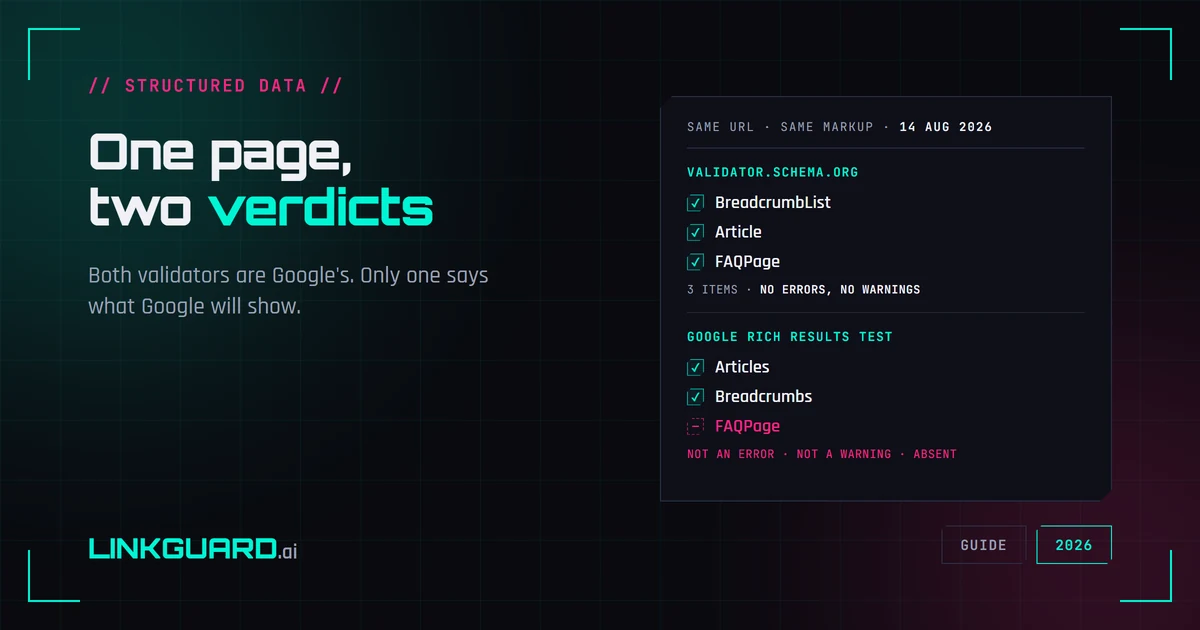
Two schema validators, two verdicts: which one decides your rich result
The same page passes schema.org's validator with three items and no warnings, and Google's Rich Results Test with two. Nothing errored. One item is simply absent. Both tools are Google's, both are right, and only one of them is telling you what Google will actually show. Run on our own page, on 14 August 2026.